After a lot of thinking and consulting with Victor and Calvin I decide I’m pretty much done with the dome sanding/fitting. There’s some minor gaps but I can tweak them later and some may work themselves out for various reasons and decisions later.
I think I’ve been procrastinating and using the gaps as an excuse not to starting cutting some holes, so tonight was the night.
I started off with an easy one – the front holoprojector. It went a lot quicker and easier than I’d thought and the result was excellent if I do say so myself.
Basic Steps
- Overlay outer dome and mark circle.
- Find center of circle using some quick math.
- Decide on diameter of hole to cut and first mark with a compass then set the drill hole cutting tool the same.
- Double check slightly larger marked hole with outer dome again.
- Center punch hole.
- Drill pilot hole.
- Drill hole the same size as drill cutting tool bit.
- Start cutting.
- At some point I broke thru on some spots so stopped.
- Dremeled pie wedges using a reinforced cut-off wheel and snapped off the pieces when done.
- File off burrs, hold breath and test fit.
That’s it, and to be honest it was pretty easy really. I’d decide to make the hole exactly the same diameter as the outer hole. If I screwed up I figured I could always sand/file it bigger, but making it too big might be a problem. The holoprojector fit perfectly and a quick test fit of the dome looked really good.


Check out this video of my wobbling/bobbing drill bit.
I was about to drill another when the battery died on my cordless drill, so I’ll have to wait till tomorrow now.
Took a break today from sanding. I did some more test fitting, but I’m really trying to build up the courage to drill some holes in the dome.
Decide instead to review movie footage and reference pictures on what dome color scheme and panel layout I wanted to use. I’ve seen a lot of fan made R2’s which can vary widely both in quality and paint schemes, and there’s a lot of pictures of them out there – but not many of a real R2. The best collection is in the Gallery section on Astromech.net, but for some strange reason the photographers seem to miss his left side. I wish someone had a full set of 360 degree high-res photos . I guess it’s a good job we have the DVDs for reference.
One of my favorite sets of photos of a fan made dome is from Mike Marosy. He’s gone for a very clean look, and has a nice set of 360 degree photos of his dome.
The real R2’s finish is not perfect by any stretch of the imagination, and as many people know there’s quite a variety in paint schemes due to different domes used from movie to movie, or even scene to scene. Parts fall off during filming too e.g. toward the beginning of ANH it looks like he’s missing a back left panel when on the Death Star and Tatooine, and in other movies panels can go from blue to unpainted or flip color on the rear PSI frame/center. Another variation is the holoprojector housing being painted or not. The list goes on.
I’ve been making replica props long enough to know that there is no way I can be movie accurate because of all the variations. So, right now I think I’m going to go mostly ANH/ESB without painting the holoprojectors. I’m going to make it so they’re easily removed anyway so I can always paint them later.
Today I also tried to mark out some of the holes and build up the courage to cut them, but during the taking the domes parts countless times I then decided I should do some more sanding/polishing to reduce gaps before I do that.
By that time it was too late into the night and I didn’t want to keep the neighbors awake, so opted to wait till tomorrow.
As I said in my post last night I was able to start on fitting the two domes together.
I’d already read about Victor’s problems on fitting his domes. From his photos I don’t think mine were as bad but I definitely had gaps. You can’t see much once the domes are on top of each other so I had to spin the outer dome around and peek thru the top holoprojector hole and check spacing.
I did some light sanding but things we’re changing much, so being the impatient person I am I decided to use a power sander and give the top of the inner dome a once over to try and remove some of the waves/lines. Fit was much much better and I decided to remove the pie panels and see how far I needed to go.
I’d already read Jerry’s tutorial over at Astromech.net so rather than repeat too much stuff here. I’d strongly recommend reading it if you’re just starting on your R&J Dome.
I “crafted” a mini saw out of a cheap/small hacksaw blade with some duct-tape wrapped around it. I didn’t want to use a standard hacksaw blade as they looked too big and the recommendation was to use an Xacto-hacksaw which I couldn’t find locally. So my make-shift mini-saw did the trick.

Here’s the top of the dome all cut out.
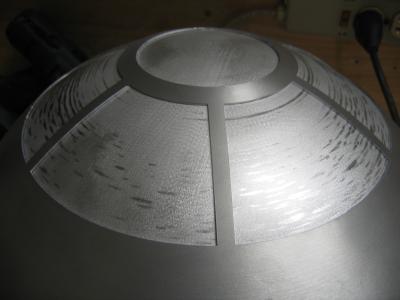
The only place there was any significant gaps where at the bottom of the pie wedges. Not huge I know and I’m thinking I may not even need to do much more once I factor in the glue that will be holding things together. However if I decide to use hinges then I may need to tweak the gap some.

So the plan today is to do some additional fitting and checking the other panels. I know there’s space behind some and I also need to clean up areas of the inner dome that will be exposed thru the outer.
Maybe I’ll even get to cutting some holes today.
As always more pictures in the Dome Album.
Posted by Chris on January 1st, 2007 in Dome | Comments Off on Dome Fitting / Gaps Part 2
Just got the PSI Blinker Units from Fiber Optic Products.
This is somewhat of a warning, and time saver to others to get the right thing the first time. If you’ve ever tried to use their website you’ll understand my frustration and confusion. And their return policy is a nightmare to read. They’re email address also doesn’t work and they never answer the phone.
I’d ordered the Dual LED Blinker Unit based on recommendations on the Builders Forum

There’s two reasons I’m disappointed, 1) the flash/blink is not very accurate at all, and 2) the description reads like the flash rate was adjustable – but they’re not. Here’s the text from the website –
“The New R2D2 Unit will flash the Red Long, Blue Short, or Yellow Long, Green Short. The Duel-2 unit has adjustable speed for each LED. Please select color choice. DO NOT turn pot full or you will burn out unit!”
They have another well hidden page that’s the New Dual-2.

I know I know, they say that in the text for the Dual but it sounded like that’s what I was ordering.
Boards look identical BTW – just a variable resistors/pots in two spots instead of a fix resistor, so I may try and swap them out if I can’t return them.
The only saving thing was that they’re were only $8.50 a piece.
I really should have just waited for the next PSI run from Dan.
Posted by Chris on January 1st, 2007 in Dome, Electronics | Comments Off on PSI Blinker Units from Fiber Optic Products
Tags: blinker, psi


